
Why was this library created?
While working on one of my commissions, I needed a lightweight PHP class that would generate simple technical drawings of solids — garages, small houses, carports — with roof slope, doors, and windows marked, and then place the finished diagram in a PDF document (quote, preliminary design, attachment for the client). I did not want to pull in a full CAD engine, WebGL in the browser, or a complicated graphics stack. A PHP server, parameters from a form or database (width, depth, height), and a clear line drawing were enough.
That need led to the 3Ddrawing library: an isometric drawing generator saved as SVG, which can be embedded in HTML or converted to PDF with an external tool (e.g. wkhtmltopdf, Dompdf with embedded SVG, Inkscape in a pipeline).
What problem does it solve?
In many industries (construction, metal garages, summer houses), clients repeatedly ask: “What will it look like?” and “What are the dimensions?” Drawing manually for every quote is time-consuming; full CAD is overkill. 3Ddrawing fills the gap between “a drawing in Paint” and a professional design:
- Parameterization — dimensions in PHP code come from variables (e.g. from POST), and the drawing updates automatically.
- Consistent style — lines, dimensions with arrows, and labels look the same in every quote.
- Lightweight — no dependency on client-side JavaScript; generation on the server.
- PDF integration — SVG is vector graphics that scales well in print.
Technologies and environment
- PHP 8.1 or newer — uses typing,
readonly, named arguments, among others. - Composer — PSR-4 autoload, namespace
Drawing3D\. - SVG — output format (lines, text, dimension arrow markers).
- Isometric projection — 3D→2D math in PHP (no OpenGL, WebGL, or GD for the 3D scene itself).
- No external PHP libraries in
composer.jsonbeyond PHP itself — the project is as simple as possible to deploy on a typical LAMP host.
Target environment: a web server with PHP (e.g. Linux, Apache or nginx + PHP-FPM); locally, e.g. php -S localhost:8080 -t examples in the project directory. Units in the model (mm, cm) are arbitrary — the library does not convert them; it relies on consistent values in 3D coordinates.
How does it work in brief?
You provide points in 3D space (x — width, y — depth, z — height). The IsometricProjector class projects them onto a 2D plane. SvgCanvas collects SVG elements. The toSvg() or toHtml() method returns the finished result.
This is not full 3D — it is an isometric technical diagram, like a sketch on paper, suitable for quotes and supporting documentation, not for a building permit.
Structure and main classes
| Component | Role |
|---|---|
Drawing3D |
Main API: line3D(), box3D(), text3D(), arrowDimension(), fitToModel() |
IsometricProjector |
Isometric projection, scale, offset, fit to canvas size |
SvgCanvas |
Buffer for lines, text, dimensions with arrows |
ArrowDimension |
Dimensions with double arrows and a label (any string) |
GarageDrawer, HouseDrawer, … |
Ready-made building sketches (garage, house, shed, carport, etc.) |
StrokeStyle |
Line style: main, auxiliary, dashed, accent |
Capabilities
- Drawing 3D edges as SVG lines (
line3D). - Boxes (
box3D), filled walls (face3D). - Ready-made buildings: single- and dual-pitch garage, asymmetric roof slope, house, shed, carport, barn, L-shaped building, workshop, greenhouse.
- Openings: doors, windows, gate — as frames on the front or side wall.
- Roofs matched to walls (mono-pitch — top wall edge in the same plane as the roof).
- Dimensions with arrows and a centered label (
arrowDimension), e.g. Width: 600 cm. - Automatic scale fitting (
fitToModel) to image size. - Export: plain SVG or a ready HTML page with the drawing embedded.
- 10 examples in the
examples/directory.
Configuration options
Canvas size and fitting
$drawing = Drawing3D::create(900, 650); // SVG width and height in px
$drawing->fitToModel($drawing->boxCorners(0, 0, 0, 600, 400, 320), padding: 50);
Line style
$drawing->setStroke(StrokeStyle::main());   // dark, thicker
$drawing->setStroke(StrokeStyle::hidden()); // dashed (construction edges)
Dimensions with arrow
$drawing->arrowDimension(
    [0, 0, 0],
    [600, 0, 0],
    'Width: 600 cm',
    offset: 55,
    extensions: true,
    offsetDirection: [0, 0, -1]
);

ArrowDimension::on($drawing)
    ->color('#1d4ed8')
    ->fontSize(13)
    ->between3D([0, 0, 0], [0, 0, 250], 'Height: 250 cm', offset: 40, extensions: true);
Garage — parameters
(new GarageDrawer($drawing))->draw(
    size: ['width' => 600, 'depth' => 400, 'height' => 250],
    roof: ['rise' => 70],                    // single pitch toward the back
    // roof: ['left' => 50, 'right' => 110], // asymmetric rear edge
    door: ['x' => 180, 'z' => 0, 'width' => 240, 'height' => 220],
    windows: [
        ['x' => 60, 'z' => 140, 'width' => 80, 'height' => 70],
    ],
);
Usage examples
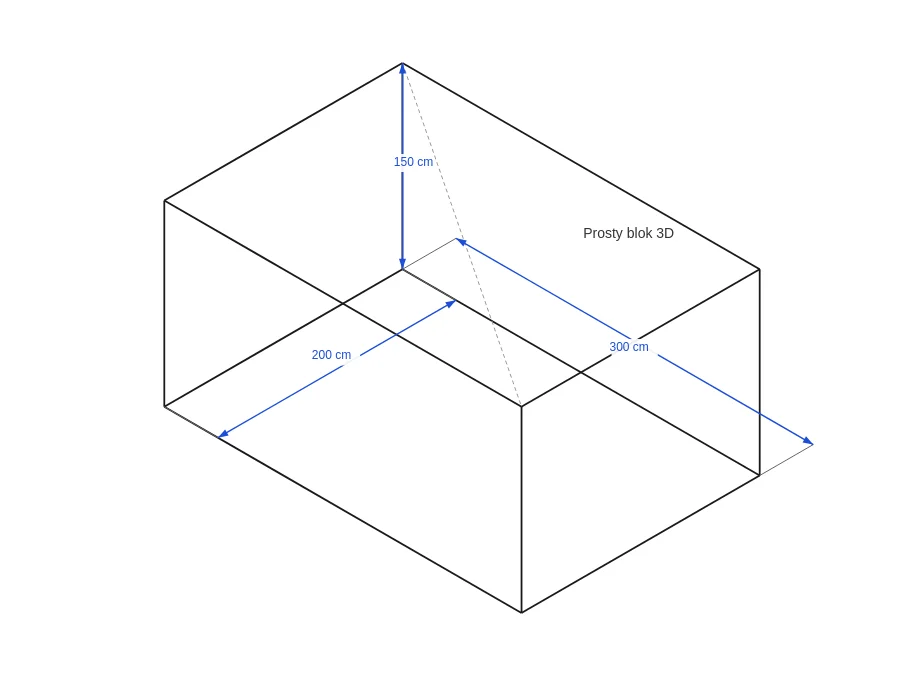
1. Minimal drawing — box
<?php
require 'vendor/autoload.php';

use Drawing3D\Drawing3D;

$drawing = Drawing3D::create(800, 600);
$drawing->fitToModel($drawing->boxCorners(0, 0, 0, 300, 200, 150));
$drawing->box3D(0, 0, 0, 300, 200, 150);
$drawing->arrowDimension([0, 0, 0], [300, 0, 0], '300 cm', offset: 45, extensions: true);

file_put_contents('box.svg', $drawing->toSvg());
Result screen:
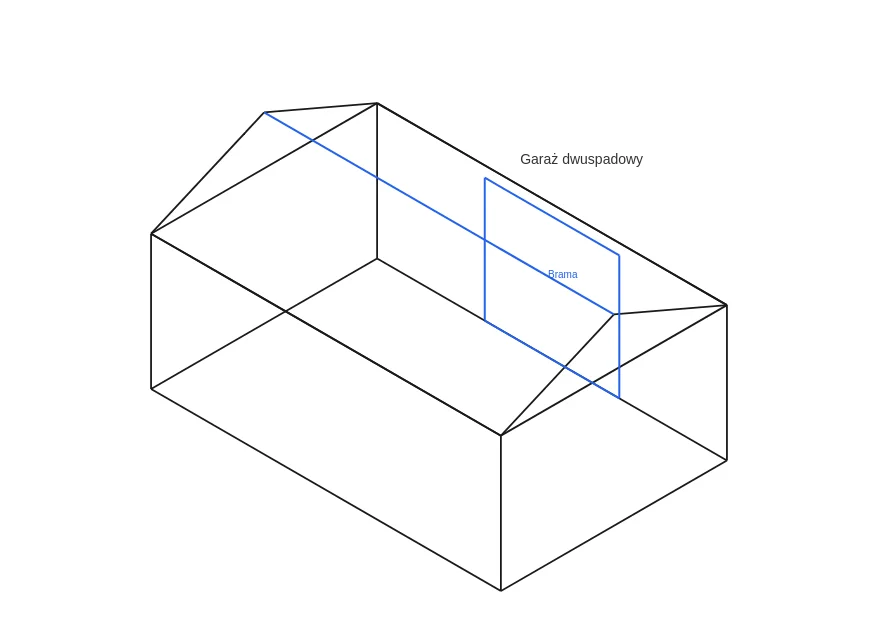
2. Single-pitch garage for a PDF quote
<?php
require 'vendor/autoload.php';

use Drawing3D\Drawing3D;
use Drawing3D\Building\GarageDrawer;

$drawing = Drawing3D::create(900, 650);
$drawing->fitToModel($drawing->boxCorners(0, 0, 0, 600, 400, 320));

(new GarageDrawer($drawing))->draw(
    size: ['width' => 600, 'depth' => 400, 'height' => 250],
    roof: ['rise' => 70],
    door: ['x' => 180, 'z' => 0, 'width' => 240, 'height' => 220],
);

$svg = $drawing->toSvg();
// Embed $svg in an HTML template and generate PDF (Dompdf, wkhtmltopdf, etc.)
Result screen:
3. Custom 3D lines
$drawing->line3D([0, 0, 0], [600, 0, 0]);   // width edge
$drawing->line3D([0, 0, 0], [0, 400, 0]);   // depth
$drawing->line3D([0, 0, 250], [600, 0, 250]); // top edge
$drawing->text3D([300, -40, 200], 'Garage for client Kowalski', 14);
PDF integration
The library does not generate PDF itself — it returns SVG or HTML. A typical workflow for a commission:
- PHP builds the drawing from order parameters.
- It saves SVG or an HTML page with embedded SVG.
- A separate step (PDF library, system service) assembles the final document with quote text and the drawing.
This keeps the drawing layer independent of the chosen PDF library.
Limitations and shortcomings
Simplicity by design has a cost. It is worth knowing the limitations before using it in production:
- Isometric only — one type of projection; no arbitrary camera or shaded perspective.
- No hidden-line removal — lines “at the back” may pass through the solid; there is no edge visibility algorithm.
- Diagram, not CAD standard — no full drafting standards (gaps, sections, precise dimension anchoring on every wall).
- Simplified dimensions — arrows work well on straight segments; complex dimension chains require manual layout.
- No photorealistic textures or fills — lines only and light wall fills.
- No in-browser interaction — no rotating the model with the mouse (can be added separately in JS, but that is not part of the library).
- PDF on the integration side — you must choose an SVG→PDF converter yourself; some PDF engines handle complex SVG poorly.
- Ready-made buildings have fixed logic — non-standard shapes (e.g. a polygon in plan) require manual
line3Dor extending classes inBuilding/.
Summary
3Ddrawing is a tool for a PHP developer who wants to generate clear, parametric sketches of garages and simple solids from the server — especially when the drawing should end up in a quote or PDF, not in a full CAD system. It was born from a real commission; it solves the problem of a “fast, repeatable technical drawing without heavy software.” If you accept the limits of an isometric diagram, it works well as a lightweight, easy-to-deploy layer between order data and the client document.